Makanak Jo is a Jordan-focused shared-room housing platform.
The idea is simple: connect people who have an empty room with people looking for affordable shared housing. Instead of listings being scattered across social media groups, random posts, and word of mouth, the goal is to build a more structured local platform for room sharing in Jordan.
But this project was never just about building the app UI.
For me, Makanak Jo was also about building a complete production system from the ground up: frontend, backend, database, authentication, email verification, uploads, CI/CD, Docker deployment, reverse proxying, private server access, firewall rules, and Cloudflare protection.
I had wanted to build a complete app that could serve real users and benefit my local community for a while. The part that held me back was not really the frontend or backend code. It was deployment.
I did not want to build something that only works on localhost and then falls apart the moment it touches the public internet. I wanted to understand the full path from code to production.
After starting my DevSecOps internship and working with GitLab CI/CD on a real production environment, I started feeling more comfortable with that side of engineering. I was trusted with tasks on a live production website, and that changed how I looked at my own projects.
At some point, the thought became simple: if I am trusted around someone else's production environment, I should probably trust myself enough to build and operate my own.
So I started building Makanak Jo seriously.
Project overview
Makanak Jo is a full-stack application split into a separate frontend and backend.
The main stack is:
- Next.js frontend
- Express and TypeScript backend
- PostgreSQL with PostGIS
- Drizzle ORM
- Docker Compose
- Nginx reverse proxy
- Cloudflare Tunnel
- GitLab CI/CD
- GitLab Container Registry
- Cloudflare R2 for listing photos
- Hetzner VPS hosting in Germany
- NetBird VPN for private server management
The app supports localized Arabic and English routes, with Arabic treated as the default direction because the target audience is local to Jordan.
At a high level, the production request path looks like this:
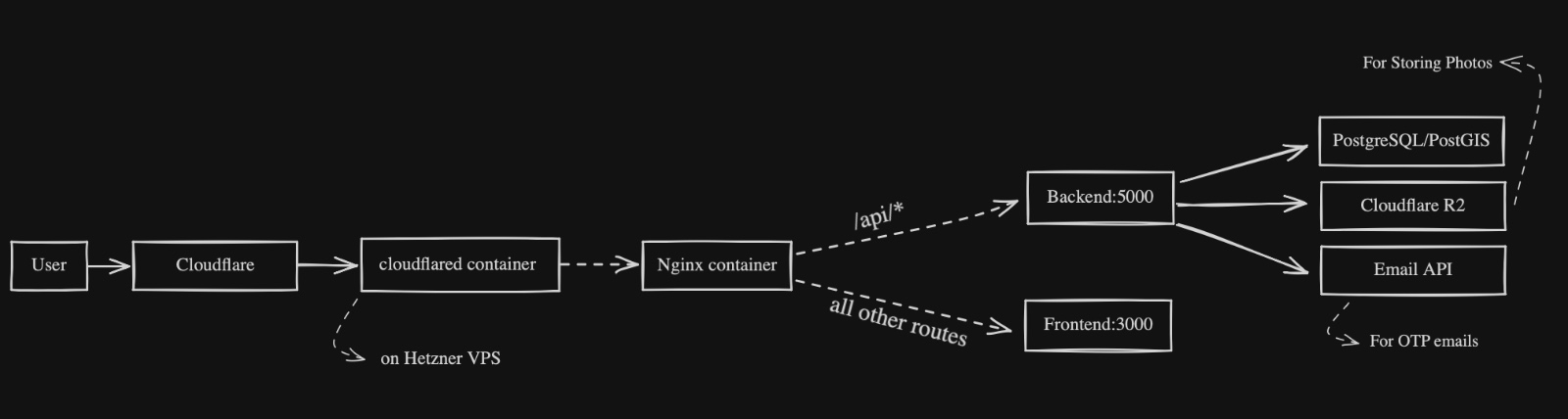
The important part is that the VPS does not expose normal inbound access to the internet. Public traffic reaches the app through Cloudflare Tunnel, and administration happens through my private NetBird VPN.
That was one of the core design decisions.
Why I cared so much about deployment
A lot of projects are built to look good in screenshots.
That is fine for a demo, but it skips the hard part: actually running the thing.
For this project, I wanted to answer the operational questions too:
- Where is the app hosted?
- How does traffic reach it?
- How do I deploy updates?
- How do I avoid exposing SSH publicly?
- How do I protect the server from random internet scans?
- How do I separate public traffic from private management?
- How do I send transactional email?
- How do I store uploaded photos?
- How do I run database migrations?
- How do I build and tag images?
- How do I block broken code before deployment?
- How do I make the system understandable enough to maintain?
Hosting on a Hetzner VPS
At launch, the production environment was hosted on a Hetzner VPS in Germany.
I chose a VPS because I wanted control over the runtime. The app is not deployed to a fully managed frontend platform or an abstracted PaaS. It runs as a Docker Compose stack on a server I manage.
That gives me control over:
- Docker services
- Reverse proxying
- Environment files
- Network exposure
- Firewall rules
- Deployment behavior
- Private access
- Logs and runtime debugging
The downside is that I am responsible for operating the server properly.
That is why I designed the network access model carefully.
The VPS firewall is strict:
- Inbound: nothing allowed
- Outbound: everything allowed
No public SSH. No exposed app ports. No backend port open to the internet. No database port exposed. Nothing inbound.
Users can still access the website because Cloudflare Tunnel maintains an outbound connection from the VPS to Cloudflare edge servers. Cloudflare receives public traffic, then forwards it through the tunnel to the internal Nginx container.
So the server does not need to accept inbound connections from the public internet.
Cloudflare also gives me a place to apply security rules before requests ever reach the server.
Nginx as the internal reverse proxy
Nginx runs inside the Docker Compose stack and acts as the internal ingress.
It routes requests based on path:
/api/* -> backend:5000
/*      -> frontend:3000
This keeps the public-facing URL clean while allowing frontend and backend to run as separate services.
The user sees one website:
https://www.makanakjo.com
Internally, Nginx decides whether the request belongs to the frontend or the API.
Private server management with NetBird
Since the VPS does not allow inbound SSH from the public internet, I needed a secure way to manage it.
For that, I added the VPS to my private self-hosted NetBird VPN.
NetBird gives me private network access to the server without opening port 22 publicly. I can SSH into the VPS over the private VPN path instead of exposing SSH to the internet.
I also configured strict policies around the VPS so that if it ever gets compromised, it should not be able to freely reach or infect my personal devices. The goal is to allow secure management access without turning my private network into a buffet.
That was important to me because connecting servers and personal devices through a VPN can become risky if policies are too relaxed.
Cloudflare security rules and bot protection
One thing I learned from previous public deployments is that the internet starts scanning your site almost immediately.
Even small websites get hit with requests looking for exposed files and common mistakes:
/.env
/.git/config
/backup.zip
/config.php
/random-admin-path
/whatever-url.env
These are usually bots looking for leaked secrets, old frameworks, exposed backups, or misconfigured apps.
For Makanak Jo, I added strict Cloudflare security rules.
One rule introduces an interactive challenge for suspicious or unknown URLs, such as:
https://www.makanakjo.com/random
Another rule blocks obvious scraping or secret-hunting patterns, including URLs that contain things like:
.env
For example:
https://www.makanakjo.com/whatever-url.env
The idea is simple: normal users should be able to use the app, but random bots trying to find leaked environment files should get blocked before they ever reach my server.

GitLab CI/CD
The code is hosted on GitLab, and the CI/CD pipeline also runs through GitLab.
This was intentional. During my DevSecOps internship, I worked with GitLab CI/CD on a real production website, so using GitLab for this project felt like a natural continuation.
The pipeline has seven stages:
- test
- security_sca
- security_sast
- build
- backup
- setup_automated_backups
- deploy
There are separate test and software composition analysis jobs for the frontend and backend, along with a Semgrep SAST job.
The frontend job runs checks like:
npm ci
npm audit --audit-level=high
npm run lint
npm run typecheck
npm run test
npm run build
The backend job runs:
npm ci
npm audit --audit-level=high
npm run lint
npm run typecheck
npm run test:unit
npm run db:migrate
npm run test:integration
npm run test:final
npm run build
So before anything is deployed, both sides of the app need to pass dependency installation, audit checks, linting, type checking, tests, and builds. The SCA and SAST jobs add dependency and static-analysis scanning to the pipeline; they are configured as manual, allowed-to-fail security checks.
That matters because deployment should not be the place where obvious mistakes are discovered.
The build job creates Docker images for the frontend and backend and pushes them to the GitLab Container Registry.
After the images are built, the backup stage creates an encrypted database backup and uploads it to Cloudflare R2. The setup_automated_backups stage has a different purpose: it is a manual, one-time provisioning step that configures the server to create daily and weekly database backups automatically. I run it once when setting up a server, not on every pipeline. After that, the backup jobs run on their own.
Keeping this setup in the pipeline makes the server more ephemeral and reproducible. If I later decide to move Makanak Jo to a different hosting provider or replace the server, I can provision the backup jobs again from the project instead of manually configuring them from scratch.

Docker images and deployment
The build job tags images with both:
- latest
- commit SHA
The actual deployment uses the commit SHA image tags.
That is important because a commit SHA is immutable and specific. It tells me exactly what version is deployed.
Using latest for deployment can become messy because it is a moving target. It might be convenient, but it does not clearly describe what is running.
The deploy job copies the production environment file, appends the SHA-specific image names, pulls the images, and starts the stack:
docker compose pull
docker compose up -d --remove-orphans --wait --wait-timeout 180
The full flow is:
Push code
  -> frontend checks
  -> backend checks
  -> SCA and SAST scans
  -> build Docker images
  -> push images to GitLab Container Registry
  -> create and upload an encrypted database backup
  -> optionally run the one-time manual backup-job setup
  -> deploy SHA-tagged images
  -> Docker Compose updates services
This gives the project a repeatable deployment path.
No manual rebuilds, no manually copying files into random folders, and no SSHing into the server.
Docker Compose runtime stack
The production stack runs with Docker Compose.
The main services are:
- PostgreSQL/PostGIS database
- Backend API
- Frontend Next.js app
- Nginx reverse proxy
- Cloudflare Tunnel
The frontend is built as a standalone Next.js output and runs on port 3000.
The backend is compiled from TypeScript and runs on port 5000.
The database uses a persistent Docker volume for PostgreSQL data, which gets backed up daily.
Nginx connects the public request path to the correct internal service.
Cloudflared connects the stack to Cloudflare through an outbound tunnel.
Database and migrations
The database is PostgreSQL with PostGIS.
PostGIS is useful because room listings are location-based. Housing search depends heavily on location, distance, and area. Using PostGIS gives the app a good foundation for future map and geographic filtering features.
The backend uses Drizzle ORM, and migrations live with the backend code.
The backend container entrypoint can run migrations and seed logic before starting the server:
node dist/db/migrate.js
node dist/db/seed.js
node dist/server.js
This behavior is controlled by environment variables:
RUN_MIGRATIONS=true
RUN_SEED=true
Storage and listing photos
The app supports photo uploads for listings.
The backend uses Multer for upload handling and Sharp for image processing.
Storage is abstracted into two modes:
- memory
- S3-compatible
Memory storage is useful for local development and testing.
For production, the app supports S3-compatible storage (Cloudflare R2) using the AWS SDK.
This is important because uploaded photos should not live inside the backend container. Containers should be replaceable.
Object storage keeps uploaded files separate from the application runtime, which makes the system safer and easier to maintain.
Frontend and localization
The frontend is built with:
- Next.js App Router
- React
- TypeScript
- Tailwind CSS
The app supports localized routes:
/ar
/en
Arabic is the default user experience direction because the app is meant for Jordanian users.
The frontend includes pages and flows for:
- Browsing listings
- Authentication
- OTP verification
- Listing creation and management
- Localized content
The frontend talks to the backend through a centralized API client, which keeps API communication more consistent across the app.
Backend API
The backend is an Express and TypeScript API.
It includes routes for:
- Authentication
- Listings
- Listing photos
- Listing boosts
- Listing reports
- Admin actions
- Media routes
- Health checks
The backend uses:
- Drizzle ORM
- PostgreSQL/PostGIS
- Zod validation
- JWT auth
- Argon2 password hashing
- Cookie-based auth
- Pino logging
- Swagger API docs
- Helmet
- CORS
- Rate limiting
Swagger docs are available for inspecting the API.
The goal was to avoid building an API that only I can understand. API documentation makes the backend easier to test, inspect, and maintain.
Security-minded backend defaults
The backend includes several production-minded security defaults:
- Helmet for HTTP security headers
- CORS restricted by frontend origin
- Rate limiting
- Cookie-based auth
- Secure cookie configuration
- SameSite cookie configuration
- Access and refresh token secrets
- Argon2 password hashing
- Zod request validation
- Zod environment validation
- Trust proxy support for Cloudflare and reverse proxy setups
- Pino redaction for cookies and auth headers
The backend should validate input, avoid leaking sensitive values into logs, reject bad configuration early, and behave correctly behind Cloudflare and Nginx.
Testing strategy
The backend uses Vitest, Supertest, and Testcontainers tooling.
It includes:
- Unit tests
- Integration tests
- Final full-flow tests
- Coverage through V8
The frontend uses Node's built-in test runner for checks like SEO and layout behavior.
More importantly, these tests are part of the CI/CD pipeline.
They run before build and deployment.
What I learned
This project helped me connect application development with infrastructure and operations.
The biggest lesson was that building a production app is not just about writing the frontend and backend.
It is also about:
- Hosting the app somewhere real
- Designing the network path
- Keeping inbound ports closed
- Using Cloudflare Tunnel for public access
- Managing the server privately over VPN
- Applying firewall and VPN policies
- Blocking common bot and secret-scanning traffic
- Setting up CI/CD
- Building and tagging Docker images
- Deploying immutable image versions
- Managing environment variables
- Running database migrations
- Sending transactional email
- Handling uploaded files outside containers
- Validating configuration
- Thinking about logs, secrets, and runtime behavior
This is the part of software engineering I wanted more practice with.
The app itself is a shared-room housing platform, but the deeper value of the project came from building the system around it.
What I would improve next
There are still several things I want to improve.
First, I want stronger observability. The backend already uses structured logging, but I would like to add better metrics, dashboards, alerts, and error tracking. Logs are useful, but production systems need visibility before something becomes a disaster.
Second, I want better deployment safety. The current deployment flow uses Docker Compose and waits for services, but I would like stronger health checks, clearer rollback behavior, and eventually a safer zero-downtime deployment pattern.
Third, I want to expand end-to-end testing. The backend has unit, integration, and full-flow tests, but user flows like registration, OTP verification, listing creation, photo uploads, and saved searches would benefit from browser-based E2E tests.
Fourth, I want to improve infrastructure reproducibility. Docker Compose works well for now, but I would eventually like to define more infrastructure as code, including server setup, DNS records, Cloudflare rules, object storage configuration, and deployment prerequisites.
Fifth, I want to improve trust and safety features inside the app itself. For a housing platform, reporting, moderation, spam prevention, and stronger verification matter. Email verification is a good start, but phone verification or other trust features may become useful later if the app grows enough to justify the cost.
What happened after launch
After two full months of trying to make Makanak Jo work, I have decided to stop actively managing it. I did everything I could think of to get people to use the platform. I sent private messages, commented on random posts to encourage people to try it, and ran Facebook and Instagram ads.
The response was encouraging in some ways. I received a lot of support, likes, and amazing comments in university Facebook groups. But the actual demand was much smaller than the level of interest suggested. The service is very niche in Jordan. Only three people added rooms to the platform. Even though the site averaged around 1,000 real visitors per day, not bots, most visitors left almost immediately. My guess is that many of them clicked through from the Facebook or Instagram ads without having an immediate need for the service.
Ultimately, it just did not take off. I am taking that as a learning experience rather than a failure. It gave me the chance to put the skills I learned during my DevSecOps internship into practice, from securing and deploying the app to operating a real public service and learning from its usage.
I will leave the site functional, but I will no longer manage the infrastructure myself. That level of ongoing work is too much for a project that did not gain traction, so I moved the frontend to Vercel, the backend to Railway, and the database to Neon, using their generous free tiers. This keeps the project alive as a showcase and leaves the door open for people to use it again. If demand returns, I would be happy to move everything back to a self-managed Hetzner VPS.
Conclusion
Makanak Jo started as a local shared-room housing app for Jordan, but it became a much bigger project about building and operating a real full-stack service.
The app uses Next.js, Express, TypeScript, PostgreSQL, PostGIS, Drizzle, Docker, Nginx, Cloudflare Tunnel, GitLab CI/CD, and S3-compatible storage.
The original production environment ran on a Hetzner VPS in Germany with no inbound firewall access. Public traffic reached the app through Cloudflare Tunnel, and private administration happened through my self-hosted NetBird VPN without exposing SSH to the internet.
That deployment model was one of the most important parts of the project.
It let me build something public while keeping the server tightly locked down.
It also gave me hands-on practice with the space between application code and production operations: CI/CD, container images, reverse proxying, tunneling, firewalling, private access, email infrastructure, object storage, database migrations, and security rules.
That was the real value of this project.
Not just building an app that works.
Building an app that can be deployed, managed, protected, and improved.