At some point, I realized I was paying a suspicious number of small monthly fees to companies whose servers were doing things that my own hardware could probably handle while half asleep.
Photo storage subscription. Deployment platforms. Automation tools. Analytics dashboards. Slowly but surely, my bank account was funding an ever-growing collection of "just a few dollars a month" services.
At the same time, another thought kept creeping in: why does someone else need to hold all of this data for me?
That combination, subscription fatigue, curiosity, and a mild distrust of letting every tech company babysit my data, eventually pushed me down the self-hosting rabbit hole.
What started as a small experiment quickly turned into a small ecosystem of services running partly in the cloud and partly on an old laptop humming quietly in my home. Some of them are genuinely useful. Some of them are arguably unnecessary. All of them, however, have one thing in common: they run on infrastructure that I control.
And if you enjoy tinkering with technology even a little bit, that feeling is surprisingly addictive.
Where I host my services
There are two main places to self-host services:
- At home, on a homelab
- In the cloud, on a VPS
A homelab can be anything from an old laptop you turned into a server to an actual rack-mounted machine humming away in the corner of your house. In my case, it is an old laptop running Proxmox VE 24/7. Inside Proxmox, I have an Ubuntu VM running the vast majority of my Dockerized services, alongside lightweight LXC containers for specific standalone tools.
I use both home hosting and cloud hosting, depending on what the service needs.
For services that must be publicly accessible or need high uptime, I host them in the cloud.
For services where I care more about latency, privacy, or security of the hosted data, I run them at home.
That split has worked really well for me. The cloud handles the public-facing stuff, and the home server handles the more personal, local, and privacy-sensitive side of things.
How I manage everything securely
Before talking about the actual services, it makes sense to talk about how I manage my servers.
The short version: I self-host NetBird, and it is carrying this entire setup on its back.
NetBird is an open-source mesh VPN, similar in concept to Tailscale or ZeroTier, but with one crucial difference: you can self-host the entire thing. The management server, the relay infrastructure, all of it. No third-party company sitting in the middle of my network traffic, no trusting someone else's infrastructure with the keys to my devices. My mesh, my rules.
That alone made the switch worth it. There is something deeply satisfying about running your own VPN network and knowing that exactly zero companies are involved in the conversation between your devices.
One of my favorite parts of the setup is the DNS and certificate situation. I use Caddy with DNS challenges to get publicly valid SSL certificates for domain names that only resolve within my NetBird network. From the outside, those domains go nowhere. From inside the Netbird network or from my Home network (more on that in the next section), everything gets a clean HTTPS connection with a real certificate. No self-signed certificate warnings, no browser complaints, just proper TLS for internal services. It is the kind of setup that feels almost too clean.
SSH is locked down to NetBird SSH only. Port 22 is not exposed anywhere, not on the home server, not on the VPS, not on anything. The only way to SSH into any of my machines is through the NetBird network. If you are not on it, those servers might as well not exist.
I also use the VPS and my Home server as exit nodes, so when I need a more traditional VPN experience, I can route my traffic through whichever server makes sense. Need to appear like I am at home while traveling? Exit through the home server. Need a cloud IP? Exit through the VPS. It is flexible and surprisingly convenient.
The real security backbone, though, is the access policies. Every device and server on the network has detailed rules defining exactly which ports it can talk to on which other devices. If a device gets compromised, it cannot just start poking around the entire network. It can only reach what it was explicitly allowed to reach, and nothing more. Deny by default, allow by exception.
That model gives me a lot of peace of mind. It is clean, granular, and much less stressful than exposing services to the public internet and hoping for the best.
Making home services reachable from everywhere
For the services running on my home server at 192.168.x.xxx, Caddy sits in front of them as a reverse proxy handling HTTPS. The challenge was: I wanted all my devices to access these services, both the ones on my home WiFi and the ones I use remotely with NetBird, without having to install NetBird on every single device in the house. And even for devices that do have NetBird installed, I did not want to keep it connected all the time because the battery draw is genuinely painful. For reference, a phone connected to NetBird used 38% battery just idling for 9 hours overnight. That is not a typo.
The solution turned out to be surprisingly elegant.
For DNS, I pointed all my domain A records in Cloudflare to my server's LAN IP 192.168.x.xxx. Every device resolves to the same address regardless of where it is.
For my local home devices, this just works. My phone on WiFi resolves service.domain.tld to 192.168.x.xxx, and since it is on the same 192.168.0.0/24 subnet, the traffic goes straight over my LAN to Caddy. No VPN, no tunnel, just regular local network traffic doing exactly what local network traffic is supposed to do.
For my remote devices running NetBird, I advertised my entire home LAN subnet 192.168.0.0/24 as a Network in the NetBird dashboard, with my home server as the routing peer. This tells every remote NetBird peer that if they need to reach anything on 192.168.0.0/24, they should send that traffic through the WireGuard tunnel to my home server. So when my phone is outside the house and resolves service.domain.tld to 192.168.x.xxx, instead of that being a dead end, since it is a private IP that does not exist on whatever public network I am on, the NetBird client intercepts it and tunnels it to my home server. My server receives the packet on Netbird interface, NATs the source IP via masquerade, and forwards it to 192.168.x.xxx, which is itself. Caddy picks it up and serves the response back through the tunnel. It is one of those setups that sounds complicated when you describe it but feels invisible when you use it.
Finally, to keep things locked down on the home front, all guest devices and IoT gadgets sit on a separate local guest network that cannot reach 192.168.0.0/24. Because the last thing I need is a compromised smart Tv or a Guest's compromised phone poking around my self-hosted services.
With that out of the way, here are the services I host.
Services I host in the cloud
NetBird Management
The NetBird management server and relay infrastructure live on my primary VPS. This is the backbone of my entire networking setup, everything described in the sections above depends on it running. It handles peer authentication, network policies, DNS, and route advertisements, while the relay infrastructure makes sure devices can always connect even when direct peer-to-peer connections are not possible.
NetBird ships with Traefik as its default reverse proxy, but I also run Caddy alongside it for handling the DNS challenges and internal HTTPS setup described in the sections above.
If this goes down, the rest of the setup gets very lonely very fast.
AdGuard Home (Semi-Public DNS)
I run a dedicated AdGuard Home instance on a new Oracle Cloud VPS to provide ad and tracker blocking for myself and my family across all our devices.
Running a DNS resolver in the cloud can quickly turn into a security disaster if you leave standard port 53 open to the public (hello, open resolver and DDoS reflection attacks). To keep things rock-solid and secure, I run it semi-publicly with a few strict constraints:
- DNS-over-TLS (DoT) only: Only port 853 is exposed to the outside world. Standard unencrypted port 53 is completely closed.
- Admin dashboard on NetBird: The web administration interface is locked down entirely to my NetBird network. If you are not on the mesh, the dashboard does not exist.
- Strict Client ID routing: AdGuard is configured to only answer queries directed to specific, long client IDs via TLS SNI. If a random scanner or bot queries
blahblah.dns.domain.comor the bare domain, it gets zero response. But when a family member's phone connects tolongclientidiconfigured.dns.domain.com, AdGuard happily filters ads and resolves the query.
This setup allows me to configure native Private DNS on Android and mobile configuration profiles on iOS for family members. Everyone gets encrypted, ad-free internet wherever they go without needing full-time VPN connections running in the background.
Beszel client
My VPS instances also run Beszel clients, which tie into the central monitoring setup I use on my home server. More on that in a bit.
Services I host on my home server
Uptime Kuma
I use Uptime Kuma to monitor all my Docker containers and websites.
It is one of those tools that just does its job well. I have it configured to send me Telegram notifications whenever a service or site goes down, which means I do not have to manually check whether something broke. The server gets to panic for me.
Dockge
I use Dockge for managing Docker containers on the fly.
It makes container management much more convenient, especially when I want to quickly adjust, update, or inspect services without turning everything into a full production ritual.
n8n
I self-host n8n on my home server.
I am very intrigued by workflow automation and what n8n can do, although I have not gone particularly deep with it yet. Right now, my usage is fairly simple: I have it watching GitHub releases RSS feeds for some of my favorite services, and it notifies me when new updates are published.
Not exactly a huge automation empire, but it is a start.
ChangeDetection
I run ChangeDetection on my home server to continuously monitor certain websites and get alerted whenever something changes.
It is one of those services that sounds niche until you realize how many things you quietly wish you were keeping an eye on. Price drops on that gadget you have been eyeing. Stock availability for something perpetually sold out. A company quietly updating their privacy policy at 2 AM hoping nobody notices. ChangeDetection watches all of it so I do not have to.
It just sits there, refreshing pages on a schedule, and pings me whenever something is different. Simple, effective, and occasionally the bearer of very good news.
Baïkal
For calendar syncing, I run Baïkal in a dedicated LXC container inside Proxmox.
Baïkal is a lightweight, purpose-built CalDAV and CardDAV server. On macOS, it syncs seamlessly with Fantastical, and on Android, it talks to DAVx⁵. My calendars and tasks stay perfectly in sync across all devices without relying on Google Calendar or Apple iCloud.
Because calendar syncing needs to happen reliably without draining phone battery by keeping NetBird connected 24/7, I made Baïkal publicly reachable through a cloudflared (Cloudflare Tunnel) sidecar. But "publicly reachable" comes with serious layers of defense:
- Cloudflare WAF geo-blocking: At the Cloudflare edge, strict security rules drop traffic from every single country in the world except the specific country I am currently located in.
- Restricted admin dashboard: The Baïkal web administration interface is strictly locked to my NetBird network. Even if someone matches the geo-rule, the administrative backend is completely unreachable from the public internet.
It is lean, fast, and does one job exceptionally well.
Vaultwarden
For password management, I run Vaultwarden.
It is a lightweight, self-hosted implementation of the Bitwarden server, which means I get to use all of Bitwarden's official apps and browser extensions while keeping my vault entirely on my own hardware. All the convenience of a commercial password manager, none of the "please trust us with every credential you own" energy.
Of all the services in my setup, this one might be the most non-negotiable. Losing access to your photos is painful. Losing access to your passwords is catastrophic.
Speedtest Tracker
I run Speedtest Tracker on my home server to continuously monitor my internet speed.
It runs automated speed tests on a schedule and logs the results over time, which means I always have actual data to back me up when my connection feels suspiciously slow. There is something deeply satisfying about being able to pull up a graph and say, "No, it is not just me. The speeds really did drop last Tuesday."
It is also useful for keeping my ISP honest. If they promise certain speeds, I now have receipts.
VERT
I self-host VERT on my home server for file conversion right in the browser.
Need to turn a PNG into a WebP? A DOCX into a PDF? VERT handles it all locally without uploading anything to some random conversion site that probably does who-knows-what with your files. Everything runs in the browser, fast and private.
I also run vertd alongside it, which handles the heavier server-side video conversions that would make a browser tap out. Between the two of them, most of my file conversion needs are covered without ever leaving my own network.
BentoPDF
I run BentoPDF for handling PDFs directly in the browser.
Merging, splitting, compressing, converting all the PDF operations that usually send you to one of those ad-infested "free PDF tools" websites. Except this one runs on my own server, so my documents stay exactly where they should: with me. It is one of those services I do not use every day, but when I need it, I am very glad it is there.
MeTube
I also run MeTube for downloading media.
It is a clean web UI for yt-dlp, which means I can grab videos or audio from a long list of supported sites without needing to remember command-line flags or wrestle with terminal windows. Just paste a URL, pick a format, and let it do its thing.
Perfect for saving tutorials, lectures, or anything else I might want to watch later without relying on the internet to keep it available forever.
AIOStreams
I also self-host AIOStreams, which is an add-on that groups Stremio add-ons.
That is all I will say about that. iykyk.
Beszel
For monitoring system resources, I use Beszel.
I run the Beszel server and a client on my home server, and I also run a client on the VPS. That way, my home server acts as the coordinator, and the dashboard gives me visibility into both machines from one place.
I also configured alerts for things like:
- high RAM usage
- high CPU load over time
- high server temperature
That makes it much easier to catch issues before they turn into "why is everything suddenly on fire?" moments.
How I handle backups
A self-hosted setup without a solid backup strategy is just an elaborate countdown to disaster. Hardware degrades, updates occasionally break things, and a single late-night terminal mistake can ruin your entire week.
Here is how I keep my data protected across both cloud and home:
Cloud VPS Backups
The NetBird management server holds the configuration, encryption keys, and network policies for my entire mesh. If that database disappears, re-registering every peer and rebuilding network policies would be a nightmare.
On the VPS running NetBird, a scheduled cron job handles the heavy lifting:
- It takes a fresh backup of the NetBird SQLite management database.
- It encrypts the database backup and uploads it offsite to Cloudflare R2 object storage.
- It bundles that encrypted backup alongside a full copy of all server configuration files into a zip archive and sends that zip securely to my home server over the NetBird network.
This gives me both an encrypted offsite cloud backup in Cloudflare R2 and an independent local backup sitting right on my own hardware.
Home Server Backups
On the home front, Proxmox VE makes disaster recovery almost effortless.
I have automated Proxmox backups running twice a day. Every single virtual machine (including the primary Ubuntu VM hosting all Docker stacks) and every LXC container gets fully backed up directly to dedicated external storage.
If a container breaks or an update goes sideways, there is zero drama. I can restore the entire VM or container in minutes and keep moving.
Bringing it all together with a personal dashboard
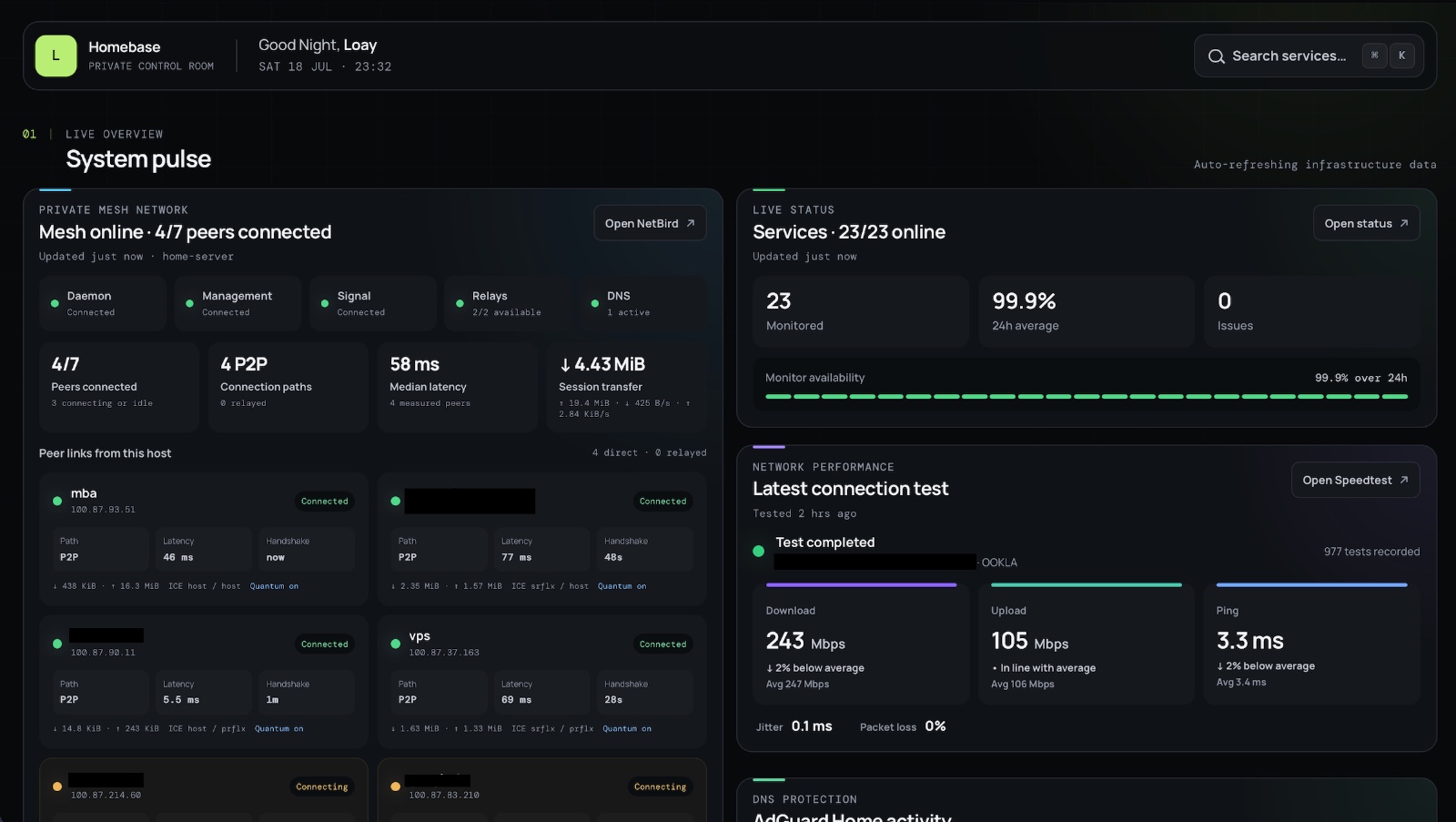
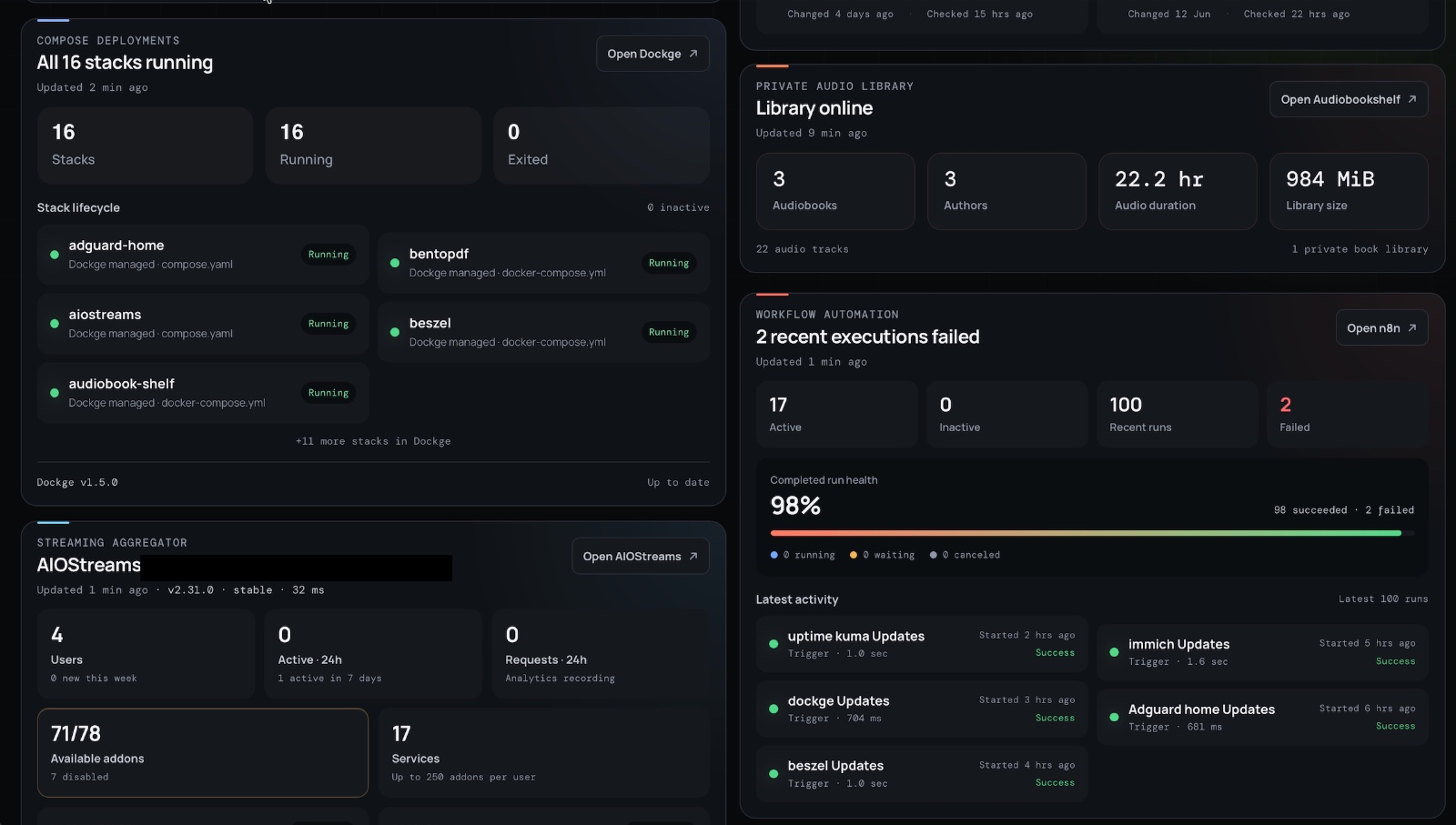
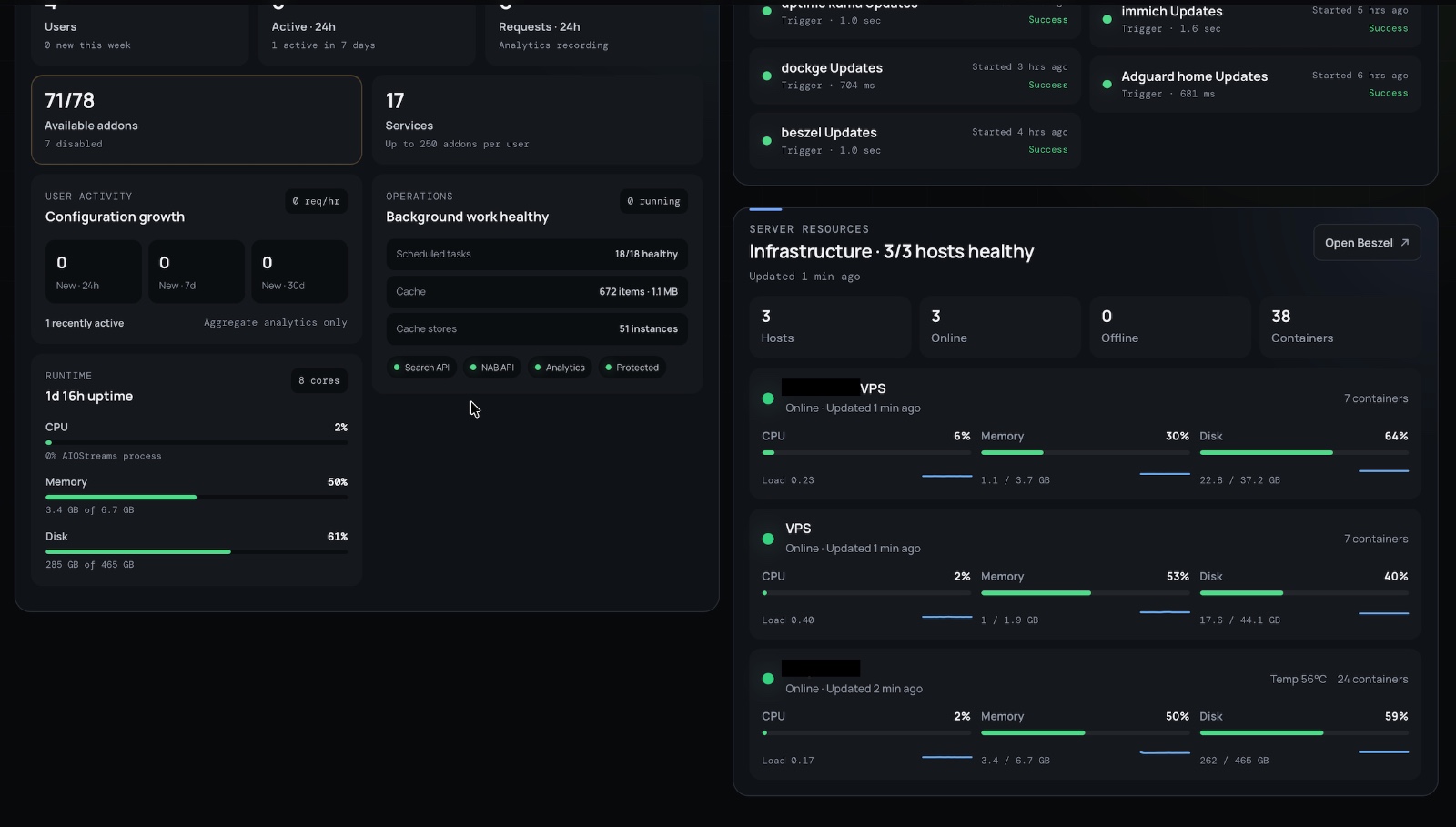
As the number of services grew, opening a dozen separate dashboards stopped being charming and started becoming annoying. So I built Homebase, a private dashboard that pulls the most useful information from each service into one place.
It gives me a live overview of my NetBird network, service uptime, DNS filtering, internet performance, Docker stacks, automation workflows, and server resources. It is not intended to replace the original administration interfaces. Instead, it answers the questions I care about most: Is everything online? Is anything failing? Are my servers healthy? And which service needs attention?
The dashboard is only accessible from my private network, and the service links open the full administration interfaces when I need deeper control.
Honorable mentions
These are services I genuinely enjoyed running but eventually retired. Not because they were bad , quite the opposite , but because reality had a few notes.
Coolify
Coolify is a free and open-source alternative to platforms like Vercel and Netlify. I used it for about a month to deploy my portfolio and blog, and it was a great way to learn what it actually takes to host websites entirely on my own. The interface is clean, deployments are straightforward, and the whole experience taught me a lot about how deployment platforms work under the hood.
After a month, though, I decided to move both sites back to Vercel. Their free tier is genuinely generous, and given that my sites do not exactly get a flood of traffic, self-hosting a deployment platform for them just was not worth the overhead. Sometimes the best lesson from doing something yourself is learning when to let someone else handle it.
Umami
Umami is a lightweight, privacy-focused analytics platform, and I ran it for about a month alongside Coolify. It was a genuinely nice alternative to Google Analytics, no cookies, no creepy tracking scripts, just clean stats. I mostly wanted to try running my own analytics stack and see what self-hosted observability looks like in practice.
But with Vercel's free tier already including built-in analytics, maintaining a separate self-hosted analytics service for sites that barely get any traffic did not make much sense. It was a fun experiment and I am glad I tried it, but Vercel's built-in analytics covers everything I need without the extra moving parts.
Immich
Immich is genuinely one of the most impressive open-source projects in the self-hosting ecosystem. It is a full Google Photos replacement with a polished mobile app, facial recognition, and locally run machine learning that feels magic.
I self-hosted it for a good while and loved the experience. But over time, I realized I already had plenty of redundant automated backups in place for all my photos (both cloud and local). Having a dedicated, resource-heavy photo management platform on top of existing backups ended up feeling like extra operational overhead for a problem I had already solved.
It is an extraordinary tool that I would recommend in a heartbeat to anyone looking to de-Google their photo library, but retiring it helped keep my active stack lean and low-maintenance.
Do I actually need all of this?
Honestly?
Not really.
Some of these services are essential to me, and some are absolutely in the "this is probably unnecessary, but it is fun and useful enough to justify itself" category.
And that is part of the appeal of self-hosting.
Not everything has to be strictly necessary. Sometimes the point is learning something new, experimenting, or building a setup that feels more personal and more under your control. As long as you have the resources to run it and you enjoy tinkering, there is nothing wrong with hosting a few extra services just because you can.
Self-hosting is not always about raw practicality. Sometimes it is also about ownership, curiosity, and the satisfaction of saying, "Yes, I run that myself."
My VPS provider
For a long time, I used Hetzner, and honestly, it is hard not to recommend them. They offer powerful machines at very reasonable prices, and they have been a great option for self-hosting in the cloud.
More recently, though, I discovered Oracle Cloud's Always Free instances.
Do I have strong feelings about Oracle as a company? Yes.
Are those feelings positive? Not especially.
But free is free, and for now that has won the argument.
At the moment, all the cloud-hosted services I mentioned are running on Oracle Always Free VPS instances.
I also found a very helpful guide by the creator of AIOStreams that explains how to get a powerful free VPS from Oracle:
https://guides.viren070.me/selfhosting/oracle
It is a genuinely useful guide if you want to experiment with cloud hosting without immediately paying for infrastructure.
Final thoughts
If there is one thing I have learned from this setup, it is that self-hosting is rarely just about saving money or replacing subscriptions.
Those are nice side effects, of course. But the real appeal is something a little harder to quantify. It is the satisfaction of knowing where your data lives, how your services work, and having the freedom to shape your own infrastructure exactly the way you want it.
Some people collect mechanical keyboards. Some people restore old cars. Apparently, I collect Docker containers and quietly running servers.
Do I strictly need every service in this setup? Probably not. But that is part of the fun. Self-hosting is half practicality and half curiosity-driven tinkering.
And once you realize that an old laptop and a cheap, or free, VPS can replace a surprising number of modern cloud services, it becomes very hard to stop adding "just one more thing" to the stack.